

23.20 SR
Virtual DJ and Karaoke Studio 8 (PC) (1 Device, Lifetime) - VirtualDj Key - GLOBAL
Product details

Platform
VirtualDj

Region
GLOBAL

Type
Key
Virtual DJ and Karaoke Studio 8 is DJ, karaoke and video software for Windows PC, supporting MP3+CDG karaoke, ZIP playback, and many audio/video formats for live parties, bars, clubs, and events.Virtual DJ and Kara...
View full description →
1 offer available
Compare sellers, delivery times and prices.
Sort by:
Instant delivery
1 offerProduct information
Everything you need to know about this product.
Release Date: November 20, 2021
Number of Devices: 1 Device
Duration: Lifetime
Virtual DJ and Karaoke Studio 8 is DJ, karaoke and video software for Windows PC, supporting MP3+CDG karaoke, ZIP playback, and many audio/video formats for live parties, bars, clubs, and events.
Virtual DJ and Karaoke Studio 8 Key Features
- Full-featured DJ, karaoke and video system for Windows PC
- Support for MP3+CDG karaoke, ZIP files, and most audio and video formats
- Mixer-board interface with volume faders, mute controls, crossfader assignment, and pitch/tempo controls
- Video playback for mixing music, karaoke, and video files
- Singer list for managing karaoke queues and upcoming performers
- Playlist support with Auto-Crossfade for continuous music playback
- Headphone cueing with an extra sound card or audio device
- Support for secondary displays, TVs, or monitors for karaoke lyrics and singer lists
DJ Mixing and Event Control
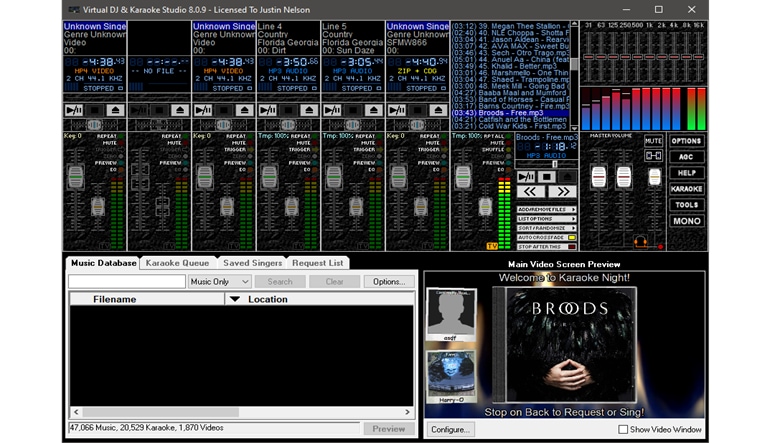
Virtual DJ and Karaoke Studio 8 gives DJs a practical mixer-board layout designed for live entertainment. Each line includes player controls, volume adjustment, mute options, crossfader assignment, and pitch or tempo control, making it easier to manage music, transitions, and karaoke tracks during an event.
Karaoke Hosting Made Easier
The software is built for karaoke performers and hosts who want to replace physical karaoke CDs with a laptop-based setup. It supports MP3+CDG karaoke and ZIP playback, so users can manage songs digitally while keeping lyrics synchronized for performers and audiences.
Video, Lyrics, and Display Support
Virtual DJ and Karaoke Studio 8 can mix video, music, and karaoke files. It also supports visual backgrounds such as video, camera input, or still images, while CDG lyrics can appear over the background on a connected screen, TV, or second monitor.
Playlist and Headphone Preview Tools
With playlist support and Auto-Crossfade, users can prepare a full music set and let the software handle smooth transitions. Headphone cueing allows DJs to preview songs before playing them live, which is useful for beat-matching, checking the next track, or managing a professional event flow.
Who will like Virtual DJ and Karaoke Studio 8
- Mobile DJs who need DJ, karaoke, and video tools in one Windows PC program
- Karaoke hosts managing singer queues at bars, clubs, or private parties
- Event entertainers looking for playlist, mixing, and lyric display features
- Users who want to play MP3+CDG karaoke files without relying on physical discs
- Performers and venues that use a second monitor, TV, or display for karaoke lyrics
Source used: official VDJ.Net product and download pages. :contentReference[oaicite:0]{index=0}
- Download the software from this link
- Install the application on your computer.
- Run the installed application.
- Enter the license key or activation code when prompted during the setup or within the software interface.
Where does Virtual DJ and Karaoke Studio 8 on DGSKA.COM come from?
All keys available on the DGSKA.COM Marketplace are sold by business-verified sellers only. This helps maintain a secure and reliable marketplace where buyers can shop for digital software with confidence.
These sellers include:
- Software publishers and official partners who make their items available on the marketplace.
- Wholesalers and distributors who acquire software keys in bulk from authorized sources and offer them through verified business accounts.
DGSKA.COM does not allow individual, non-business sellers to sell on the marketplace, which adds another layer of marketplace security.
Is it safe to buy Virtual DJ and Karaoke Studio 8 on DGSKA.COM?
Yes. DGSKA Marketplace uses secure payment methods, AI-supported account protection, human verification procedures, anti-fraud systems, and seller verification processes to help provide a safe shopping experience.
How do I verify a seller's reliability on DGSKA.COM?
All sellers on DGSKA.COM are verified before they can start selling and are reviewed regularly to make sure they continue to meet marketplace requirements. This means buyers can expect reliable support if any issue appears during or after the purchase process. Sellers who consistently provide a high standard of customer service can earn the Excellent Seller badge, which is visible on their store page.
Can I get a refund for Virtual DJ and Karaoke Studio 8 purchased on DGSKA.COM?
Each seller sets their own refund terms and conditions. You can check the details on the seller’s store page before making a purchase.
If you need more information, you can contact the seller directly by using the "Contact seller" button on their store page.
Are there hidden fees when buying Virtual DJ and Karaoke Studio 8 on DGSKA.COM?
Depending on the payment method selected during checkout, additional fees may apply. However, there are no hidden charges, and the final amount shown at the end of the payment process is the total price you pay.
Release Date: November 20, 2021
Number of Devices: 1 Device
Duration: Lifetime
Virtual DJ and Karaoke Studio 8 is DJ, karaoke and video software for Windows PC, supporting MP3+CDG karaoke, ZIP playback, and many audio/video formats for live parties, bars, clubs, and events.
Virtual DJ and Karaoke Studio 8 Key Features
- Full-featured DJ, karaoke and video system for Windows PC
- Support for MP3+CDG karaoke, ZIP files, and most audio and video formats
- Mixer-board interface with volume faders, mute controls, crossfader assignment, and pitch/tempo controls
- Video playback for mixing music, karaoke, and video files
- Singer list for managing karaoke queues and upcoming performers
- Playlist support with Auto-Crossfade for continuous music playback
- Headphone cueing with an extra sound card or audio device
- Support for secondary displays, TVs, or monitors for karaoke lyrics and singer lists
DJ Mixing and Event Control
Virtual DJ and Karaoke Studio 8 gives DJs a practical mixer-board layout designed for live entertainment. Each line includes player controls, volume adjustment, mute options, crossfader assignment, and pitch or tempo control, making it easier to manage music, transitions, and karaoke tracks during an event.
Karaoke Hosting Made Easier
The software is built for karaoke performers and hosts who want to replace physical karaoke CDs with a laptop-based setup. It supports MP3+CDG karaoke and ZIP playback, so users can manage songs digitally while keeping lyrics synchronized for performers and audiences.
Video, Lyrics, and Display Support
Virtual DJ and Karaoke Studio 8 can mix video, music, and karaoke files. It also supports visual backgrounds such as video, camera input, or still images, while CDG lyrics can appear over the background on a connected screen, TV, or second monitor.
Playlist and Headphone Preview Tools
With playlist support and Auto-Crossfade, users can prepare a full music set and let the software handle smooth transitions. Headphone cueing allows DJs to preview songs before playing them live, which is useful for beat-matching, checking the next track, or managing a professional event flow.
Who will like Virtual DJ and Karaoke Studio 8
- Mobile DJs who need DJ, karaoke, and video tools in one Windows PC program
- Karaoke hosts managing singer queues at bars, clubs, or private parties
- Event entertainers looking for playlist, mixing, and lyric display features
- Users who want to play MP3+CDG karaoke files without relying on physical discs
- Performers and venues that use a second monitor, TV, or display for karaoke lyrics
Source used: official VDJ.Net product and download pages. :contentReference[oaicite:0]{index=0}
- Download the software from this link
- Install the application on your computer.
- Run the installed application.
- Enter the license key or activation code when prompted during the setup or within the software interface.
Where does Virtual DJ and Karaoke Studio 8 on DGSKA.COM come from?
All keys available on the DGSKA.COM Marketplace are sold by business-verified sellers only. This helps maintain a secure and reliable marketplace where buyers can shop for digital software with confidence.
These sellers include:
- Software publishers and official partners who make their items available on the marketplace.
- Wholesalers and distributors who acquire software keys in bulk from authorized sources and offer them through verified business accounts.
DGSKA.COM does not allow individual, non-business sellers to sell on the marketplace, which adds another layer of marketplace security.
Is it safe to buy Virtual DJ and Karaoke Studio 8 on DGSKA.COM?
Yes. DGSKA Marketplace uses secure payment methods, AI-supported account protection, human verification procedures, anti-fraud systems, and seller verification processes to help provide a safe shopping experience.
How do I verify a seller's reliability on DGSKA.COM?
All sellers on DGSKA.COM are verified before they can start selling and are reviewed regularly to make sure they continue to meet marketplace requirements. This means buyers can expect reliable support if any issue appears during or after the purchase process. Sellers who consistently provide a high standard of customer service can earn the Excellent Seller badge, which is visible on their store page.
Can I get a refund for Virtual DJ and Karaoke Studio 8 purchased on DGSKA.COM?
Each seller sets their own refund terms and conditions. You can check the details on the seller’s store page before making a purchase.
If you need more information, you can contact the seller directly by using the "Contact seller" button on their store page.
Are there hidden fees when buying Virtual DJ and Karaoke Studio 8 on DGSKA.COM?
Depending on the payment method selected during checkout, additional fees may apply. However, there are no hidden charges, and the final amount shown at the end of the payment process is the total price you pay.
Customer reviews
Why
DGSKA?
DGSKA?
Curated digital products
Carefully selected products from verified sellers
Protected payments
Secure checkout with trusted payment methods
Trusted sellers
Seller profiles with feedback and verification
Marketplace support
Clear order details and seller-based purchasing
Added to cart